Video Downloader - Video Saver
- 4.0
- Rating
- 10.00M
- Installs
- Free
- Price

 Analysis by App-foxy
When I need to keep a video or story available for later, I usually want a simple tool rather than a full editing suite. Video Downloader - Video Saver is aimed at that exact moment: finding a video, saving it, and preparing it for viewing or later creative reference. I found it most useful as a practical collection tool for people who gather clips before making a post, assembling a mood board, or planning a short video of their own.
The app sits in the video players and editors category, although its role is closer to downloading and organizing source material than editing finished work. It is made by GetItDone, costs nothing to install, and is rated for Everyone. Its store summary focuses on fast HD downloads, stories, privacy, and quality, but my impression is more grounded: it is a focused utility that can shorten the distance between seeing something useful and having it available on the device.
From a creative idea to a saved reference
The strongest reason to use this app is not simply entertainment. It is the small creative problem that comes before editing: you see a visual idea and want to preserve it before it disappears from a feed. That might be a transition worth studying, a story you need to revisit, or a clip that helps explain the tone you want for your own project.
You May Also Like

 Blood Strike: 2.5 Anniversary
Blood Strike’s Loadouts Turn Every Drop Into a Tactical Gamble
A close look at Blood Strike’s custom loadouts: how fast access to signature weapons reshapes its battle royale rhythm, rewards preparation, and narrows the gap between fights.

 Pandora - Music & Podcasts
Pandora’s Music Is Easy to Start, but Harder to Recover
Pandora’s strength is its low-effort path from a seed to a station. Its weak spot is how much confidence it asks you to place in connection, setup, and quiet recovery.

 8 Ball Pool
 Is Built on Rivalries, Rematches, and Routine
A close look at the rivalries, rematches, shared routines, and unanswered safety questions that turn a quick pool match into a persistent mobile community.

 Samsung Music
’s Quiet Strength Is Playing What You Already Own
Its reach comes less from spectacle than from dependable access to a personal library. That simplicity is both the app’s strongest retention engine and its ceiling.

 AccuWeather: Weather Radar
AccuWeather Review: A Quick, Clear Forecast for Everyday Decisions
For everyday plans, the best forecast is the one you can understand quickly. AccuWeather makes rain timing, radar, and local conditions easy to act on, with a few trade-offs.

 Hill Climb Racing
Why Hill Climb Racing Still Turns Crashes Into One More Run
A tiny car, a bumpy hill and one more upgrade: Hill Climb Racing keeps resurfacing because its simple chaos makes every near-miss feel personal.
More From Our News Desk



I like this starting point because it keeps the workflow clear. Instead of opening a large editor, importing media, and dealing with a timeline before I know what I am making, I can first collect the material that gives the project direction. For a creator who works from references, that separation matters. Download first, decide what is useful later.
The app’s short description is simply “Video Downloader,” and that plain wording is appropriate. It does not present itself as a complete production environment. I would not install it expecting trimming, captions, color correction, or a publishing calendar. Its value is in the handoff between discovery and creation: a clip becomes something I can inspect again when I am ready to work.
There is also a useful distinction between saving a clip for personal reference and republishing it. A downloader can make a file easier to access, but it does not automatically give anyone permission to reuse that material. I would treat the saved files as references unless I had the rights or consent needed for another purpose. That is especially important when working with stories or clips made by other people.
What the first-use experience suggests
As a free app, Video Downloader - Video Saver is easy to approach when I only need a narrow job done. The audience size also suggests that it is not an obscure experiment: it has passed the ten-million-install mark and holds a 4.0 average from roughly seventy-four thousand ratings. Those figures do not guarantee that every source will behave perfectly, but they do indicate that the basic idea has broad everyday appeal.
I would begin with a small test rather than immediately collecting a large library. Save one ordinary clip, check where it appears on the device, and confirm that it plays correctly in the gallery or preferred video player. This quick check tells me whether the current workflow fits my phone before I depend on it for a deadline.
That habit is more valuable than it sounds. Download tools can feel successful at the moment of saving while still creating confusion later: an unclear filename, a crowded folder, or a file that is difficult to identify among camera footage. I recommend creating a simple naming routine from the beginning, such as grouping saved references by project or visual theme. The app can help acquire the material, but the organization still benefits from deliberate human choices.
Building a reference library without losing control
For short-form creators, one practical workflow is to collect references in batches instead of interrupting every editing session. I might spend a few minutes gathering examples of pacing, framing, or story structure, then return to the editor with a clearer brief. This reduces the temptation to keep browsing while I am supposed to be making something.
A second useful approach is to save only the clips that answer a question. For example, I might collect one reference for an opening shot, another for text placement, and a third for the rhythm of a sequence. That is better than downloading everything that looks interesting. Storage fills more slowly, and the resulting folder becomes a working resource rather than an archive of forgotten impulses.
The app is also suitable for a simple offline-review routine when I am preparing a presentation or discussing a visual direction with someone else. Having the chosen material available on the device can make comparison easier than repeatedly searching through a feed. I would still check the original source when context, quality, or ownership matters, because a downloaded copy is not necessarily the complete story behind a post.
One trade-off is that the more successful the app becomes at collecting material, the more important file management becomes. A downloader reduces friction at the front of the process, but it can increase clutter at the back. I consider that a manageable weakness rather than a deal-breaker, provided I delete rejected references and separate temporary downloads from finished work.
Making and refining the creative process
Video Downloader - Video Saver is not where I would perform the main edit. I would use it before that stage, then move the selected files into an editor that offers a timeline and the controls needed for a finished piece. This makes the app a supporting tool in a larger workflow rather than a replacement for a dedicated editor.
That limitation is actually helpful for some people. A focused downloader does not ask me to learn a new editing interface when all I want is to preserve a source. If my task is to gather visual examples for a client mood board, save a story for later review, or collect footage before deciding on a concept, a full editor can feel unnecessarily heavy.
For a more serious production, I would use a three-step rhythm. First, save potential references. Second, review them away from the original feed and reject anything that does not contribute to the idea. Third, import only the useful material into the actual editing environment. This prevents the project from becoming a pile of unexamined downloads and keeps the creative brief visible.
The HD emphasis is relevant when a saved clip is being inspected for composition or detail. A soft copy can hide whether a shot will work, especially when I am judging text, facial expression, or the relationship between foreground and background. At the same time, I would not assume that every downloaded source becomes ideal production footage. The final result still depends on the original media and on whatever compression or limitations exist at the source.
Where the app saves time, and where it does not
The biggest time saving is the reduced number of steps between discovering a useful video and keeping it available. That matters when a story is temporary or when a reference is difficult to find again. I also appreciate that the app is positioned around videos and stories rather than trying to become a general-purpose file manager.
However, the app does not remove every point of friction. Source behavior can vary, and a downloader should not be judged as if it controls the platform hosting the content. If a particular item cannot be saved through the normal workflow, repeatedly trying the same action is unlikely to improve the creative process. In that situation, I would move on to a permitted source, ask the creator for the original, or use a screen-free alternative such as noting the idea and recreating it.
That is one reason I would not make this the only part of a professional handoff. For client work, I prefer original files, clearly licensed assets, or media exported directly from the project. A downloaded social clip may be perfectly adequate as a visual reference, but it is a weaker foundation for a final commercial deliverable.
The app’s current version is 1.7.1, and it supports Android 7.0 and later. That broad compatibility makes it accessible on many older devices, which is useful if I keep a secondary phone for downloading references or if a collaborator is not using the newest hardware. Still, compatibility is not the same as identical behavior on every phone; storage handling and the surrounding gallery experience can differ by device.
Iteration: turning saved clips into better decisions
The most valuable creative use I found is iterative comparison. Instead of asking whether one clip is “good,” I can place several references side by side in my thinking: one may have the right pacing, another the right camera distance, and a third the right emotional tone. The download step makes that comparison possible without constantly returning to a moving feed.
I would keep the first collection intentionally small, then review it with a specific question. Does the material clarify the opening? Does it show a useful way to reveal information? Does it help me choose between a fast cut and a slower sequence? If the answer is no, I remove it. This turns saving into an editorial decision instead of a reflex.
A non-obvious benefit is that saved references can expose repetition in my own ideas. After reviewing several clips for a project, I may notice that I am copying the same framing or transition. That is a good moment to change direction before filming. The app does not provide that insight automatically; it simply makes the comparison practical enough for me to notice it.
Another trade-off appears when quality and storage compete. Keeping every clip in the highest available quality may be useful for close visual inspection, but it can consume space faster than lightweight references. For planning, I often need enough clarity to judge structure rather than a perfect master file. I would reserve larger files for material that genuinely needs detailed study and remove the rest after the project decisions are made.
Because in-app purchases range from $2.99 to $99.99 per item, I would pay attention to any purchase screen and decide whether the free workflow already covers my needs before spending money. The app is free to start, but “free” does not mean every optional capability must be treated as essential. My recommendation is to test the basic routine first and only consider an upgrade if it solves a problem I actually encounter.
Export, handoff, and the point where another app wins
Once I have selected useful material, the next step is moving it into the tool where the real work happens. For a simple personal project, that may mean opening the saved file in a mobile editor. For a larger project, I would copy the chosen media into a clearly named project folder and keep the downloaded references separate from original camera footage. That distinction prevents accidental use of a reference as if it were a final asset.
The handoff is easiest when I decide in advance what each file is for. A clip can be labeled mentally as “opening reference,” “lighting example,” or “story pacing,” rather than being treated as footage that must appear in the final cut. This small classification step makes collaboration clearer and helps prevent copyright confusion when several people are sharing a project.
Compared with the usual alternatives, the app occupies a narrow but useful middle ground. A browser-based approach may be convenient for occasional viewing, but it is less dependable when I need a local reference library. A screen recording can capture what is visible, yet it may add unwanted interface elements or reduce quality. A full video editor gives me much more control, but it also adds complexity when I only need to save source material. Video Downloader - Video Saver makes the most sense when the download itself is the task.
I would choose a different option if my priority were professional asset management, batch organization, detailed editing, or direct publishing. In those situations, a dedicated editor or a cloud-based media library is better suited to version control and team review. I would also skip this app if I rarely save videos and only need to watch them once; adding another utility would not improve that habit.
For an everyday scenario, imagine preparing a short travel reel over a weekend. I might save a few public story references to study how creators introduce a location, another clip to compare transitions, and one example of a quiet ending. Later, I would review the collection, keep only the ideas that fit my own footage, and delete the rest. The app helps with the gathering stage, while the editor, camera files, and my own decisions produce the final reel.
That division of labor is important. The app can support a creative brief, but it cannot replace the judgment needed to choose a concept, shoot original material, edit with purpose, or deliver a polished export. I see it as a small utility that earns its place when it removes a repeated annoyance from those stages.
Who should install it?
I would recommend Video Downloader - Video Saver to people who regularly collect video references, revisit stories, or need a straightforward way to keep clips available for later creative planning. It is especially useful for solo creators who work on a phone and want to separate browsing from editing. Its free entry point and Everyone rating also make it approachable for casual users who do not need a complex production setup.
I would be more cautious for users who expect a complete editing workflow. If you need trimming, effects, captions, audio mixing, project timelines, or polished exports inside one app, this is not the right center of your process. It is also not the best answer for anyone who wants a managed archive of licensed professional assets. In those cases, the usual specialized tools offer stronger control and clearer project structure.
Privacy and ownership should remain part of the decision. The store summary presents the app as secure and private, which is reassuring as a starting impression, but I would still handle saved media carefully, review the app’s current access requests on my device, and avoid collecting sensitive material unnecessarily. Most importantly, I would respect the creator and platform rules attached to anything I save or share.
My creator-focused verdict
After using it as a pre-production companion, I see Video Downloader - Video Saver as a practical bridge between inspiration and execution. It is not trying to be the place where a finished video is built, and that is both its clearest strength and its main boundary. When I need to preserve a useful clip quickly, it can make the next creative decision easier.
The app’s broad adoption, 4.0 average, and free availability make it reasonable to try, while the optional purchase range means I would keep an eye on what is included before committing to anything paid. I value it most when I use it deliberately: save a small set of references, label or sort them, review them with a question in mind, and move the selected material into the proper editing workflow.
My final recommendation is therefore specific. Install it if your creative process often begins with collecting videos or stories and you want those references ready for a later session. Skip it if you need a full editor, professional asset library, or one-click publishing pipeline. Used within its proper role, it is a useful, focused step from creative discovery to organized video production.
FAQs for Video Downloader - Video Saver
01How does Video Downloader - Video Saver work?
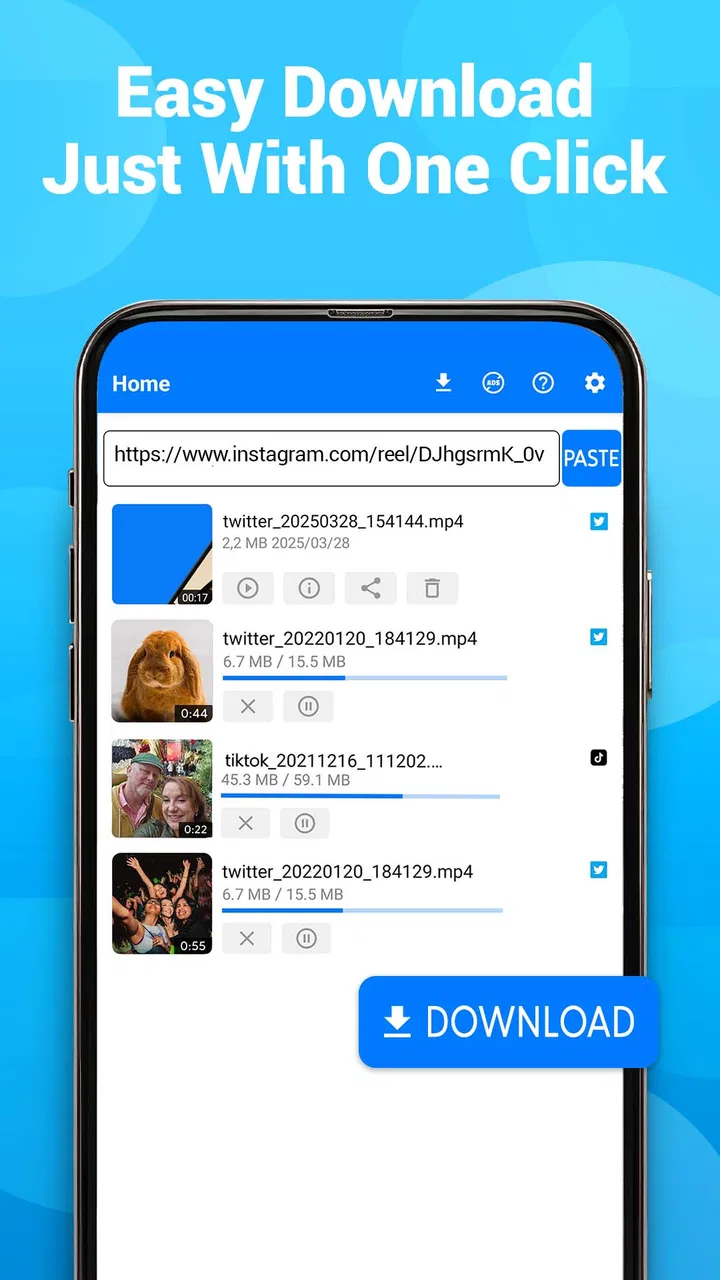
Video Downloader - Video Saver allows users to download videos from various platforms directly to their device. Once installed, users can copy the video link from their browser or app and paste it into the Video Downloader app. The app processes the link and provides options to download the video in different resolutions.
02Is Video Downloader - Video Saver compatible with all video platforms?
While Video Downloader - Video Saver supports a wide range of popular video platforms, it may not work with all websites. Official restrictions and updates to platform policies can affect compatibility. Users should check the app’s description or support page for a list of currently supported platforms.
03Is it legal to download videos using Video Downloader - Video Saver?
The legality of downloading videos can vary by platform and location. While the app facilitates downloading, users must ensure they comply with copyright laws and the terms of service of the respective video platforms. It is recommended to use the app for personal and non-commercial purposes only.
04Can Video Downloader - Video Saver download videos in high quality?
Yes, Video Downloader - Video Saver provides options to download videos in various qualities, including high definition (HD), if available. The quality options depend on the original video source. Users can select their preferred quality before initiating the download process.
05Are there any in-app purchases or ads in Video Downloader - Video Saver?
Video Downloader - Video Saver may include in-app purchases to unlock additional features or remove advertisements. The free version typically includes ads, which can be removed by upgrading to a premium version. Check the app details for specific information on pricing and available features.
Pros
- Supports multiple video formats efficiently.
- User-friendly interface for easy navigation.
- Fast download speeds with stable performance.
- Integrated search function for quick finds.
- Allows background downloading for multitasking.
Cons
- Contains ads that can be intrusive.
- Limited features in free version.
- Requires permissions that may concern some users.
- Occasional crashes reported by some users.
- No built-in video editing tools.

Video Downloader - Video Saver
Gallery